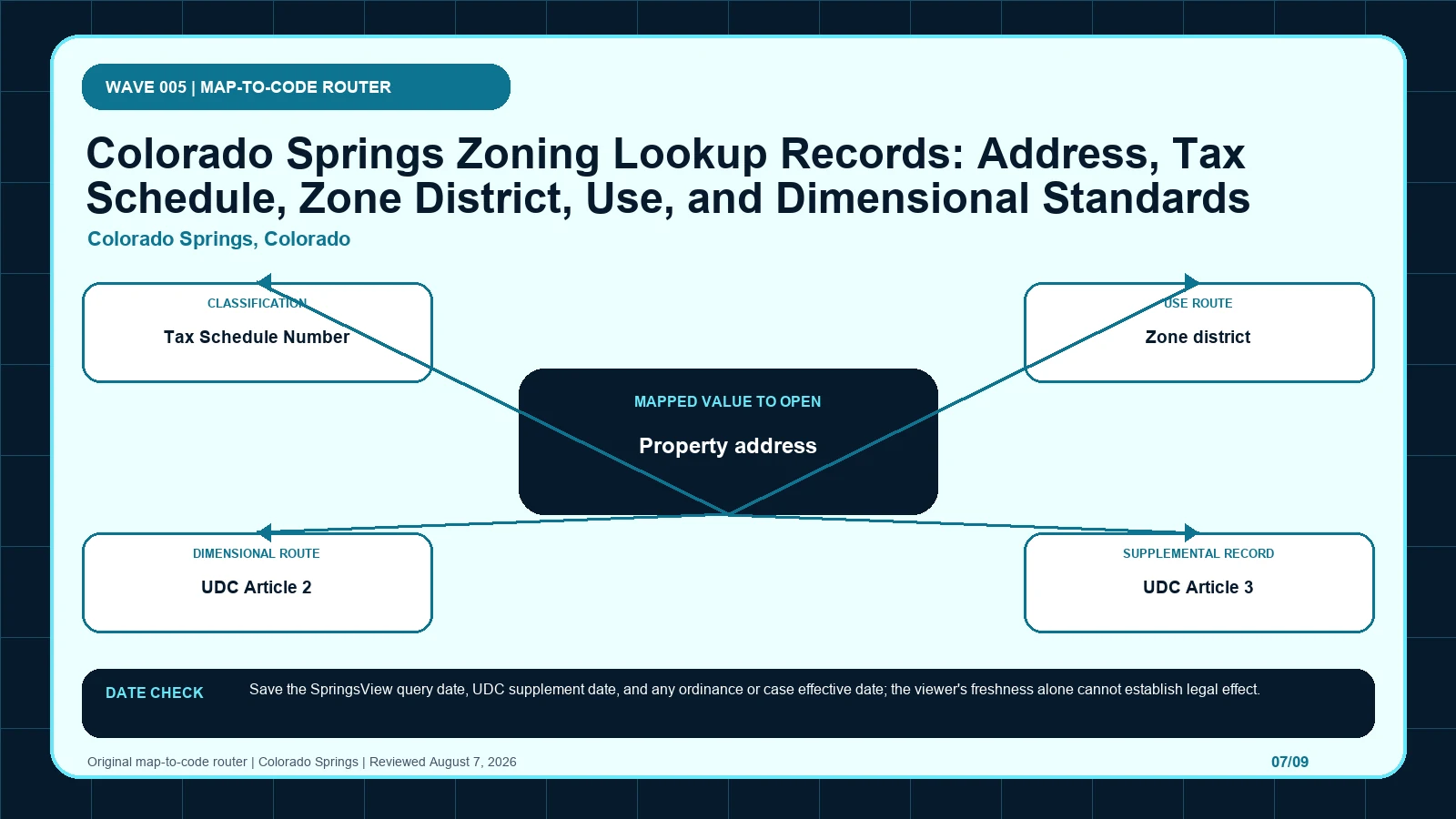
Colorado Springs zoning research is stabilized by the Tax Schedule Number, not by a nearby address label. Once SpringsView fixes that parcel, UDC Article 2 classifies the district and Article 3 tests standards or special-purpose conditions. It is not an approval.
Last checked: August 7, 2026.
Begin the tax-schedule-to-UDC-article chain at Colorado Springs Zoning Standards, which supplies official lookup and UDC workflow. Cross-check the selected geometry through Colorado Springs CityView, the route used for address and tax-schedule parcel lookup. Before copying Property address, verify coloradosprings.gov Zoning Standards and official SpringsView/CityView application; those markers keep the SpringsView TSN route tied to the intended jurisdiction and record period.
Tax Schedule Number stabilizes the parcel before the zone district
Colorado Springs research begins with two identity checks before code interpretation. The property address locates a candidate in SpringsView, while the Tax Schedule Number stabilizes the assessor parcel selected by the map. The zone district is then read from that confirmed geometry. UDC Article 2 organizes and establishes the district and applicable overlay structure; Article 3 answers separate use, dimensional, height, lot, and setback questions. An overlay or special-purpose district adds standards without replacing the base zone. The chain is therefore address to TSN, TSN to parcel geometry, geometry to district and overlay, Article 2 to classification, and Article 3 to the particular standard being researched. Starting with Article 3 before the TSN and Article 2 are confirmed can apply a perfectly quoted rule to the wrong parcel or wrong district.
Property address, TSN, and zone district are three distinct lookup records
The SpringsView TSN route table keeps each returned label beside its displayed scope and the separate legal record still waiting to be opened. Its first checkpoint is Property address, which may appear as street address input; from there, Confirm the returned geometry and tax schedule before copying zoning. A blank in the tax-schedule-to-UDC-article chain stays visible so another reader can distinguish an empty official return from an unexamined field.
| Local field, layer, or record | What it does | Displayed value or scope | Next code or record check | Official page |
|---|---|---|---|---|
| Property address search key | locates the candidate parcel in SpringsView | street address input | Confirm the returned geometry and tax schedule before copying zoning. | Open exact record |
| Tax Schedule Number (TSN) record key | identifies the selected assessor parcel | TSN lookup path named by City guidance | Use it to stabilize the property across zoning and case records. | Open exact record |
| Zone district map record | returns the mapped zoning classification | zone designation shown in SpringsView | Open the matching UDC zone-district section. | Open exact record |
| UDC Article 2 code record | contains zone-district organization and establishment provisions | official article reference | Use it to classify the returned district and applicable overlays. | Open exact record |
| UDC Article 3 code record | contains use, dimensional, and development standards | official article reference | Check permitted use, lot, height, and setback questions separately. | Open exact record |
| Overlay / special-purpose district map role | adds a supplemental standard to base zoning | enabled in SpringsView planning layers | Record the exact overlay name and UDC provision. | Open exact record |
UDC Article 2 classifies the district before Article 3 tests standards
- Open the SpringsView TSN route; fix the parcel, boundary, jurisdiction, and official key before reading thematic records.
- Start the tax-schedule-to-UDC-article chain by copying Property address exactly as returned, including street address input.
- Keep Tax Schedule Number (TSN) in a second SpringsView TSN route worksheet field because it identifies the selected assessor parcel.
- Test Zone district independently, then mark its value, service layer, or documented blank in the tax-schedule-to-UDC-article chain.
- Give UDC Article 2 and every later item a separate row; never compress history, plans, and overlays into the SpringsView TSN route result.
- Attach the SpringsView TSN route lookup time to Property address, while preserving this separate currency clue: Save the SpringsView query date, UDC supplement date, and any ordinance or case effective date; the viewer's freshness alone cannot establish legal effect.
- If Property address and Tax Schedule Number (TSN) conflict, send the tax-schedule-to-UDC-article chain to Colorado Springs Zoning Standards and ask which district organization and standards provisions apply to one TSN.
The SpringsView TSN route worksheet is complete only when another reader can reproduce the tax-schedule-to-UDC-article chain from the same parcel key and official pages. Keep each source's legal role and effective date apart, then record which district organization and standards provisions apply to one TSN as unresolved instead of selecting the most convenient output. The local currency note remains part of that audit trail: Save the SpringsView query date, UDC supplement date, and any ordinance or case effective date; the viewer's freshness alone cannot establish legal effect.
| Returned local record | Record to compare | When to stop | Next decision |
|---|---|---|---|
| Property address returns street address input | Compare with Tax Schedule Number (TSN), which identifies the selected assessor parcel | Stop the tax-schedule-to-UDC-article chain if Tax Schedule Number (TSN) is missing, dated differently, or points to another record. | Continue through the SpringsView TSN route: Confirm the returned geometry and tax schedule before copying zoning. Then test whether Tax Schedule Number (TSN) changes that route. |
| Tax Schedule Number (TSN) returns TSN lookup path named by City guidance | Compare with Zone district, which returns the mapped zoning classification | Stop the tax-schedule-to-UDC-article chain if Zone district is missing, dated differently, or points to another record. | Continue through the SpringsView TSN route: Use it to stabilize the property across zoning and case records. Then test whether Zone district changes that route. |
| Zone district returns zone designation shown in SpringsView | Compare with UDC Article 2, which contains zone-district organization and establishment provisions | Stop the tax-schedule-to-UDC-article chain if UDC Article 2 is missing, dated differently, or points to another record. | Continue through the SpringsView TSN route: Open the matching UDC zone-district section. Then test whether UDC Article 2 changes that route. |
| UDC Article 2 returns official article reference | Compare with UDC Article 3, which contains use, dimensional, and development standards | Stop the tax-schedule-to-UDC-article chain if UDC Article 3 is missing, dated differently, or points to another record. | Continue through the SpringsView TSN route: Use it to classify the returned district and applicable overlays. Then test whether UDC Article 3 changes that route. |
| UDC Article 3 returns official article reference | Compare with Overlay / special-purpose district, which adds a supplemental standard to base zoning | Stop the tax-schedule-to-UDC-article chain if Overlay / special-purpose district is missing, dated differently, or points to another record. | Continue through the SpringsView TSN route: Check permitted use, lot, height, and setback questions separately. Then test whether Overlay / special-purpose district changes that route. |
| Overlay / special-purpose district returns enabled in SpringsView planning layers | Compare with Property address, which locates the candidate parcel in SpringsView | Stop the tax-schedule-to-UDC-article chain if Property address is missing, dated differently, or points to another record. | Continue through the SpringsView TSN route: Record the exact overlay name and UDC provision. Then test whether Property address changes that route. |
A SpringsView parcel with a special-purpose district
A hypothetical Colorado Springs user enters a street address and SpringsView returns a parcel, a Tax Schedule Number, one zone district, and an intersecting special-purpose layer. The reviewer first records the TSN and verifies the parcel outline rather than copying the label beside the address point. The exact district and overlay are then classified through UDC Article 2. Only after that step does Article 3 answer the user's separate questions about use, lot dimensions, height, or setbacks. This example intentionally provides no real address, TSN, district, overlay, or outcome. It does not say that a proposed building meets any standard. It shows why a single 'zoning allows it' sentence is structurally weak: several Article 3 standards may apply, and each depends on the Article 2 district and the parcel geometry confirmed by the TSN.
An Article 3 rule applied to the wrong TSN or Article 2 district
| Local situation | What went wrong | What to retain | How to resolve it |
|---|---|---|---|
| Scenario 1 | An address result is used without matching the Tax Schedule Number. | Preserve Zone district, the selected geometry, and both timestamps from the SpringsView TSN route check. | Use Colorado Springs Zoning Standards to settle which district organization and standards provisions apply to one TSN; then Open the matching UDC zone-district section. |
| Scenario 2 | A use standard from Article 3 is applied without confirming the Article 2 district and any overlay. | Preserve UDC Article 2, the selected geometry, and both timestamps from the SpringsView TSN route check. | Use Colorado Springs Zoning Standards to settle which district organization and standards provisions apply to one TSN; then Use it to classify the returned district and applicable overlays. |
When a Colorado Springs result relies on an address without the matching TSN, or quotes Article 3 before the Article 2 district is established, repeat the lookup from the parcel. Record the returned Tax Schedule Number, confirm the polygon, and capture the exact base and supplemental district names. Classify them under Article 2, then test the specific use and dimensional questions under Article 3. If the TSN, map label, and UDC do not agree, give the City the query date and captures. Ask: 'For this Tax Schedule Number, what current base zone and overlay are shown on the official map, and which Article 2 classification and Article 3 standards should be used for the identified parcel?' This directs staff to resolve identity and code routing. It does not ask for approval or a blanket statement that every development standard is met.
SpringsView query, UDC supplement, and ordinance keep separate dates
Colorado Springs, Colorado date check: Save the SpringsView query date, UDC supplement date, and any ordinance or case effective date; the viewer's freshness alone cannot establish legal effect.
SpringsView currency, the UDC supplement, and a zoning ordinance or case can each carry a different date. A fresh map screen does not establish that the code text opened in another tab has the same publication date, and an older case can remain controlling after a viewer refresh. Save the map query date, note the UDC supplement used, and retrieve any ordinance or case effective date associated with a disputed district or overlay. The Colorado Springs viewer does not itself establish legal effect. Article 2 and Article 3 also must remain distinct: a later standards amendment in Article 3 does not change the parcel's zone label, and a map amendment does not answer every dimensional question. Keeping those sources synchronized prevents an up-to-date rule from being applied to an outdated or misidentified parcel.
Zoning Standards, CityView, and the Zoning Code divide the route
| Official page | What to check there | Local coverage shown |
|---|---|---|
| Colorado Springs Zoning Standards | official lookup and UDC workflow | City page |
| Colorado Springs CityView | address and tax-schedule parcel lookup | City-owned GIS application |
| Colorado Springs Zoning Code | controlling development code and SpringsView route | Current official City zoning-code page |
How should Property address be checked in Colorado Springs, Colorado?
Open the official Property address record and capture the value inside the SpringsView TSN route. That record shows how Property address locates the candidate parcel in SpringsView; one displayed form is street address input. Place the copied value in the tax-schedule-to-UDC-article chain, then follow its separate rule route: Confirm the returned geometry and tax schedule before copying zoning.
How should Tax Schedule Number (TSN) be checked in Colorado Springs, Colorado?
Open the official Tax Schedule Number (TSN) record and capture the value inside the SpringsView TSN route. That record shows how Tax Schedule Number (TSN) identifies the selected assessor parcel; one displayed form is TSN lookup path named by City guidance. Place the copied value in the tax-schedule-to-UDC-article chain, then follow its separate rule route: Use it to stabilize the property across zoning and case records.
How should Zone district be checked in Colorado Springs, Colorado?
Open the official Zone district record and capture the value inside the SpringsView TSN route. That record shows how Zone district returns the mapped zoning classification; one displayed form is zone designation shown in SpringsView. Place the copied value in the tax-schedule-to-UDC-article chain, then follow its separate rule route: Open the matching UDC zone-district section.
The TSN-specific question to send when map and UDC disagree
- Selected parcel key, geometry, and responsible jurisdiction
- Every returned value from the local field table
- Page titles, URLs, lookup times, and update clues
- Opened code, plan, case, ordinance, or metadata records
- Unresolved blanks, boundary splits, dates, and competing outputs
- Proposed activity stated in code-relevant facts
- Agency contact, narrow question, reply date, and limits
The SpringsView TSN route does not decide title, survey boundaries, private restrictions, vested rights, building-code compliance, utilities, licensing, or permit issuance. Request a written response when the tax-schedule-to-UDC-article chain leaves competing official results or when substantial reliance is planned. A useful request to Colorado Springs Zoning Standards identifies the parcel, quotes Property address and Tax Schedule Number (TSN), gives their source dates, and asks which district organization and standards provisions apply to one TSN.
Use colorado springs zoning map by address, zoning code vs zoning map, zoning overlays special districts only where those methods clarify the tax-schedule-to-UDC-article chain. The SpringsView TSN route evidence linked for Property address and Tax Schedule Number (TSN) remains the local starting point.
Reviewed August 7, 2026. Recheck the SpringsView TSN route, its cited ordinance, and the agency procedure before relying on the saved worksheet.